
The Meet.bot browser extension makes it effortless to share your scheduling pages. No need to copy or remember links. It keeps your Meet.bot pages one click away wherever you’re communicating, like in Gmail, LinkedIn, or chats.
Why use the extension
If you share your scheduling links frequently, the extension saves time and keeps you organized. You can access any of your Meet.bot pages instantly. No switching tabs or logging into your dashboard.
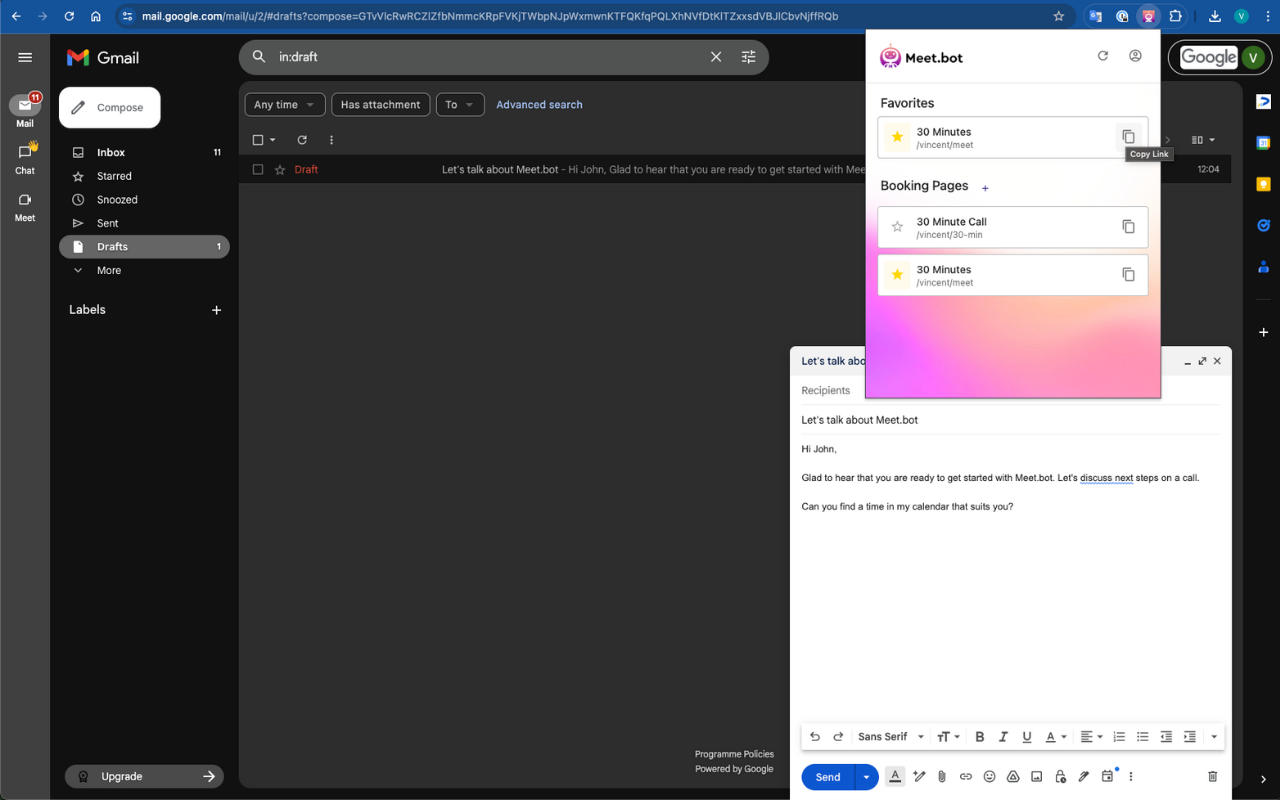
How it works
Once installed, the extension adds the Meet.bot icon to your browser toolbar.
Whenever you’re composing a message, email, or post:
Click the Meet.bot icon.
All your scheduling pages appear.
Click a page to copy its link, ready to paste wherever you’re typing.
You can also favorite pages so your most-used links show at the top, making quick sharing even faster.
How to install
Go to the Chrome Web Store and install the extension here: Meet.bot Easy Scheduling for Chrome
After installing, click the Meet.bot icon in your toolbar.
Log in to Meet.bot if it doesn't show right away
Your scheduling pages will sync automatically.
Quick sharing examples
In Gmail: click the icon while drafting an email to drop in your booking link instantly.
On LinkedIn: select your favorite scheduling page in seconds while messaging connections.
In any browser tab: the extension works anywhere you can paste text. Efficient, fast, and polished.
Why it’s great
Instantly access and share your scheduling links
Favorite key pages for even quicker sharing
Works across platforms like Gmail, LinkedIn, and Slack web
Keeps you consistent and professional wherever you communicate
With the Meet.bot browser extension, your scheduling pages are always just one click away.